by Dhry  I wanted to post a quick thanks here to my long-time friend Tony. Years ago, Tony told me that I should register dhryland.com (I had been running the site in various forms since 1997 but always off some other hosting location such as Geocities) and eventually he went and registered it for me. He has owned the domain since 2004 and we only recently transferred it to my ownership. Ευχαριστώ πάρα πολύ, Tony! I wanted to post a quick thanks here to my long-time friend Tony. Years ago, Tony told me that I should register dhryland.com (I had been running the site in various forms since 1997 but always off some other hosting location such as Geocities) and eventually he went and registered it for me. He has owned the domain since 2004 and we only recently transferred it to my ownership. Ευχαριστώ πάρα πολύ, Tony!
by Dhry  I’ve been a fan of information inhalation via RSS feeds for a long time. Originally I used to read them on the PC using GreatNews, but since then I’ve taken to caching a stack of RSS news via Google Reader onto my iPod Touch and reading on-the-go using the Reeder app. Google Reader really comes into play when you have multiple devices connecting from disparate locations so you can sync info on what you’ve read, what you’ve marked as interesting etc. After recently getting a tablet and starting the whole RSS bollocks up on that as well, I decided to hunt once again for a Windows RSS app capable of syncing with Google Reader. GreatNews doesn’t, and FeedDemon annoys the hell out of me by being feature-crippled and having ads. I’ve been a fan of information inhalation via RSS feeds for a long time. Originally I used to read them on the PC using GreatNews, but since then I’ve taken to caching a stack of RSS news via Google Reader onto my iPod Touch and reading on-the-go using the Reeder app. Google Reader really comes into play when you have multiple devices connecting from disparate locations so you can sync info on what you’ve read, what you’ve marked as interesting etc. After recently getting a tablet and starting the whole RSS bollocks up on that as well, I decided to hunt once again for a Windows RSS app capable of syncing with Google Reader. GreatNews doesn’t, and FeedDemon annoys the hell out of me by being feature-crippled and having ads.
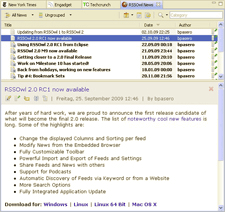
RSSOwl is a very nice, free RSS reader which is built on the Eclipse framework. It’s very configurable, isn’t too sluggish with loading and saving tens of thousands of articles, and quite frankly decisively wins over both GN and FD in terms of look and feel. You can find a full overview of its features here. After less than a week using it, I already feel it’s deserving of the coveted Dhryland Hot Download Award ranking.
RSSOwl
by Dhry  Okay, App Store authors (both Apple AND Google). Check out the list below before writing/publishing your next app. If your app does ANYTHING even REMOTELY similar to the bulleted descriptions, you’re doing something that at least five hundred other apps do and NO, your app WON’T be the best implementation or have the most original twist. Figure out something else to write. Seriously. SERIOUSLY. Okay, App Store authors (both Apple AND Google). Check out the list below before writing/publishing your next app. If your app does ANYTHING even REMOTELY similar to the bulleted descriptions, you’re doing something that at least five hundred other apps do and NO, your app WON’T be the best implementation or have the most original twist. Figure out something else to write. Seriously. SERIOUSLY.
-
Game where you need to draw a line with your finger to show a boat/plane/cat/rat/something else which boathouse/airfield/path across a road/path across a traintrack/etc to take
-
Game featuring “doodle-style” graphics which negates the need for you to actually spend more than ten seconds creating the graphics
-
A to-do list, or in fact ANY sort of list
-
A reminder app
-
A calendar app
-
A weather app
-
A clock app (with or without alarm functionality)
-
An app where you can write text and then have it sync to Dropbox as though that’s the coolest thing ever – ignore this bullet if your app syncs with SugarSync, though, since for some reason nobody’s written one of those yet and SugarSync is ten million times better than DropBox (oh, and here’s my SugarSync referral link before I forget)
-
A game which displays random items that you need to “slice” open/apart with your finger
-
A game where you use your finger to pull back a “slingshot”, thereby “firing” something at something else
-
A game featuring zombies where you’re supposed to do something, anything at all, to try and kill the zombies
-
A game where boring-arse creatures of some type follow a boring-arse predefined path across a crappily-decorated “field”, and you’re supposed to drop objects by the side of this path which will then “attack” the creatures as they pass by while you’re then expected to gibber and wring your hands in excitement and do absolutely nothing else except pray that you placed your stuff properly
-
A game where you have to “endlessly” either run sideways or climb/jump upwards
-
An app with one of the following words in the title, REGARDLESS of the premise or execution of the app: ninja, angry, tower, notes, balloon, ball
-
A game where the object is to take a character through a top-down view of lands and towns in the style of a Japanese RPG, where character interactions contain speech in bubbles which comprise 98% of the sum total of the code base of the game and require two hundred finger taps on the screen before the entire interaction concludes, whereupon you get about five seconds of actual "gameplay” before the next interaction
-
A game featuring “retro-style” graphics, either deliberately pixelated or else vectorized, purporting to transport the player back to the halcyon days of their youth where they played this type of game and wished for a future where graphics and sounds were cooler and you could do more than shoot blocky pixels at other, differently-colored, blocky pixels
Double marks subtracted if your app falls into two or more of the abovementioned categories simultaneously. K? Make it happen! (claps hands once, loudly)
by Dhry I heard a brilliant suggestion today from one of my workmates in the break room – the concept of mandatory tagging of your posts with keywords. Like "dead relative", "pets", “religion” etc. Would work great for both G+ and especially Facebook. We have it in WordPress and I have no idea why it doesn’t exist in the online social networks (yet?) Imagine being able to globally filter your friends’ posts based on keywords, so you never need to read about their dead relatives or pets or bollocks about God etc but you can read all the other stuff. Or maybe a "happiness ranking" that you can give your posts so that your friends don’t need to read anything that has a happiness ranking of –20 or a nudity ranking below 50. This way your fun, idle surfing time doesn’t need to be destroyed by having a story about your mate’s dead grandpa etc get thrown in your face, thus bringing down your entire week. Sensational idea. I should jump and patent it.
by Dhry  I’ve been a fan of Filezilla Server for a very long time. It’s a fast, free FTP server app that’s solid as a rock (as in, it has never EVER crashed on me) and supports some nice things like mode-Z compression, virtual directories and even secure transfer protocols. A while ago I heard about HTTPFileServer (HFS) but never actually thought to download and take a look at it – until today. And boy, am I impressed! You KNOW that doesn’t happen often. I’ve been a fan of Filezilla Server for a very long time. It’s a fast, free FTP server app that’s solid as a rock (as in, it has never EVER crashed on me) and supports some nice things like mode-Z compression, virtual directories and even secure transfer protocols. A while ago I heard about HTTPFileServer (HFS) but never actually thought to download and take a look at it – until today. And boy, am I impressed! You KNOW that doesn’t happen often.
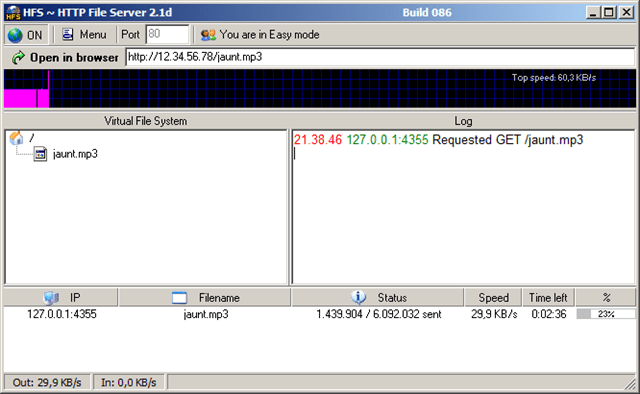
Basically this (freeware!) program is a single executable which opens up a server on your machine that allows connections and transfers via the HTTP protocol. That means anyone that you want to share files with doesn’t need an FTP client, just a browser. Assuming you configure everything correctly on your LAN and router, you can offer up directories via HFS. People can use eg Firefox to look through your directories, download individual files, tag entire folders to be .TAR-red and downloaded en masse, and even upload files to your server. Full permissions can be set on a per-directory basis. You can add folders as “real” or as “virtual”. The amount of configuration options is vast, probably another reason I like it so much. Logging to screen, file. Dynamic DNS (CJB, No-IP, DynDNS) support built-in. Bandwidth monitor. Descript.ion support. Process Explorer shows this thing idling with 25Mb RAM usage – that’s nice and low. It even offers the ability to customize the HTTP template so that the end-user can get a different look and feel – the bizarrely-named Thunderchicken of Glory skin even allows MP3 preview directly within the browser. And apparently it works fine running in Wine under Linux. (Like most of us care, eh?)
This program is obviously not for everyone, but if you need to share a set of files or folders on your machine and offer them to friends with a minimum of fuss on their end, this is definitely an awesome option. It’s even great with just sharing files on your local network. Is it better than Filezilla Server? From what I’ve seen of it, I’d say it’s on par. And that’s DEFINITELY high praise from me.
Rejetto HTTPFileServer
by Dhry 20110705: Finally, after 3 months, 3 weeks and 4 days, the iPad2 has been jailbroken. All hail Comex.
by Dhry  New software is coming out all the time for various platforms that I use and having to write a blog post updating a “top-20” list each time just won’t work – mainly because something better inevitably comes out which invalidates a previous entry. I don’t want to go back and retroactively edit entries I’ve written in the blog itself, so I’ve created three new WordPress “pages” on Dhryland which you’ll see right at the top of the screen. At the time of writing there’s nothing in them yet but just as soon as I settle down comfortably I’ll construct what I believe to be the most important programs on each platform – ones which I use every day and/or couldn’t live without. The pages will then be updated as programs are superceded by better programs etc. So bookmark them now and check them regularly. Of course, new blog entries will continue to appear at their current rate of approximately one every quarter century as and when I see fit to write ‘em. And new tweets will continue to appear, too. I know y’all love those. New software is coming out all the time for various platforms that I use and having to write a blog post updating a “top-20” list each time just won’t work – mainly because something better inevitably comes out which invalidates a previous entry. I don’t want to go back and retroactively edit entries I’ve written in the blog itself, so I’ve created three new WordPress “pages” on Dhryland which you’ll see right at the top of the screen. At the time of writing there’s nothing in them yet but just as soon as I settle down comfortably I’ll construct what I believe to be the most important programs on each platform – ones which I use every day and/or couldn’t live without. The pages will then be updated as programs are superceded by better programs etc. So bookmark them now and check them regularly. Of course, new blog entries will continue to appear at their current rate of approximately one every quarter century as and when I see fit to write ‘em. And new tweets will continue to appear, too. I know y’all love those.
by Dhry  Place your data in the cloud! (place your data in the cloud!) Place your data in the cloud! (place your data in the cloud!)
You’re gunna make ol’ Jobsie proud! (you’re gunna make ol’ Jobsie proud!)
Sound off! (one two)
Sound off! (three four)
Sound of hack-ers
Identity theft.. BACK DOOR!
by Dhry  A while ago, I noticed a quite popular extension for Google Chrome called “Disconnect”. I do use Chrome on occasion, but mostly Firefox, and I was disappointed that Disconnect wasn’t available for it. What Disconnect does is automatically prevent popular websites (such as Facebook and Google) from “tracking” you. This sort of thing is done by a LOT of websites that install “tracking code”. Often they’ll be using Google Analytics or something else that most people would consider “harmless”, but the whole point is that places you visit are matched to your IP address (ie your unique identity on the web, which in the US will also pinpoint your geographical location) and sent to websites which record and use that information. I intensely dislike that idea. If I’m on widgets.com, I don’t want Google to know that I was there at 7:15am on Wednesday 1st June 2011. If I’m on bollocks.com, I don’t want Facebook to be “told” that IP address such-and-such has visited that site. A while ago, I noticed a quite popular extension for Google Chrome called “Disconnect”. I do use Chrome on occasion, but mostly Firefox, and I was disappointed that Disconnect wasn’t available for it. What Disconnect does is automatically prevent popular websites (such as Facebook and Google) from “tracking” you. This sort of thing is done by a LOT of websites that install “tracking code”. Often they’ll be using Google Analytics or something else that most people would consider “harmless”, but the whole point is that places you visit are matched to your IP address (ie your unique identity on the web, which in the US will also pinpoint your geographical location) and sent to websites which record and use that information. I intensely dislike that idea. If I’m on widgets.com, I don’t want Google to know that I was there at 7:15am on Wednesday 1st June 2011. If I’m on bollocks.com, I don’t want Facebook to be “told” that IP address such-and-such has visited that site.
So I was understandably thrilled when I heard about Disconnect. Even more thrilled when I discovered recently that it has become available for Firefox (finally!)
And overjoyed beyond belief when I discovered through the feedback comments for Disconnect that there is another addon out there called Ghostery which does even more than Disconnect to protect your privacy online. Their website succinctly sums up what it does: Ghostery sees the invisible web – tags, web bugs, pixels and beacons. Ghostery tracks the trackers and gives you a roll-call of the ad networks, behavioral data providers, web publishers, and other companies interested in your activity. After showing you who’s tracking you, Ghostery also gives you a chance to learn more about each company it identifies. How they describe themselves, a link to their privacy policies, and a sampling of pages where we’ve found them are just a click away. Ghostery allows you to block scripts from companies that you don’t trust, delete local shared objects, and even block images and iframes. Ghostery puts your web privacy back in your hands.
 I recommend you install one of these addons as soon as possible. Google, Facebook, Yahoo and ad networks don’t need to know about you. Especially without your permission. They’re both completely free. My vote is for Ghostery, mainly because it has more capabilities. I recommend you install one of these addons as soon as possible. Google, Facebook, Yahoo and ad networks don’t need to know about you. Especially without your permission. They’re both completely free. My vote is for Ghostery, mainly because it has more capabilities.
Disconnect | Disconnect Author’s Blog | Ghostery
by Dhry For some reason I had installed two captcha systems on the site and then never actually tested it. I received a report that comments were unable to be added and this was indeed true. I have corrected the problem and comments should now work again, assuming you enter the captcha code correctly. I will also try to minimize any half-baked site tweaking in the future. Sorry about that!
|

 I wanted to post a quick thanks here to my long-time friend Tony. Years ago, Tony told me that I should register dhryland.com (I had been running the site in various forms since 1997 but always off some other hosting location such as Geocities) and eventually he went and registered it for me. He has owned the domain since 2004 and we only recently transferred it to my ownership. Ευχαριστώ πάρα πολύ, Tony!